MY SERVER / AGENT PUBLISHING
My own web server, from creation to publishing with an agent
I run company, Lab, Academy and news sites on my own hardware. An agent connects domain routing, development, content updates, deployment and checks. Here is the actual setup and a capacity model grounded in an upload measurement.
The problem
Every new service meant more hosting and administration to learn.
My approach
I routed domains to apps on my own hardware and connected changes, publication and checks through an agent.
What changed
Four public sites now share a foundation I can extend by describing the content and functions I need.
Domains · Content · Deployment · Operations
Separate hosting and administration decisions for every site.
Describe the result; connect creation, publishing and checks.
FROM REQUEST TO RESULT
How I made it work.
- 01
Describe the result
Set the content, functions and scope.
- 02
Build and connect
Connect text, images, code and the public address.
- 03
Verify and publish
Check a separate release before deploying it.
- 04
Operate and extend
Maintain services and certificates, then extend them.
MY SERVER / FOUR PUBLIC DESTINATIONS
One personal server. A different space at each address.
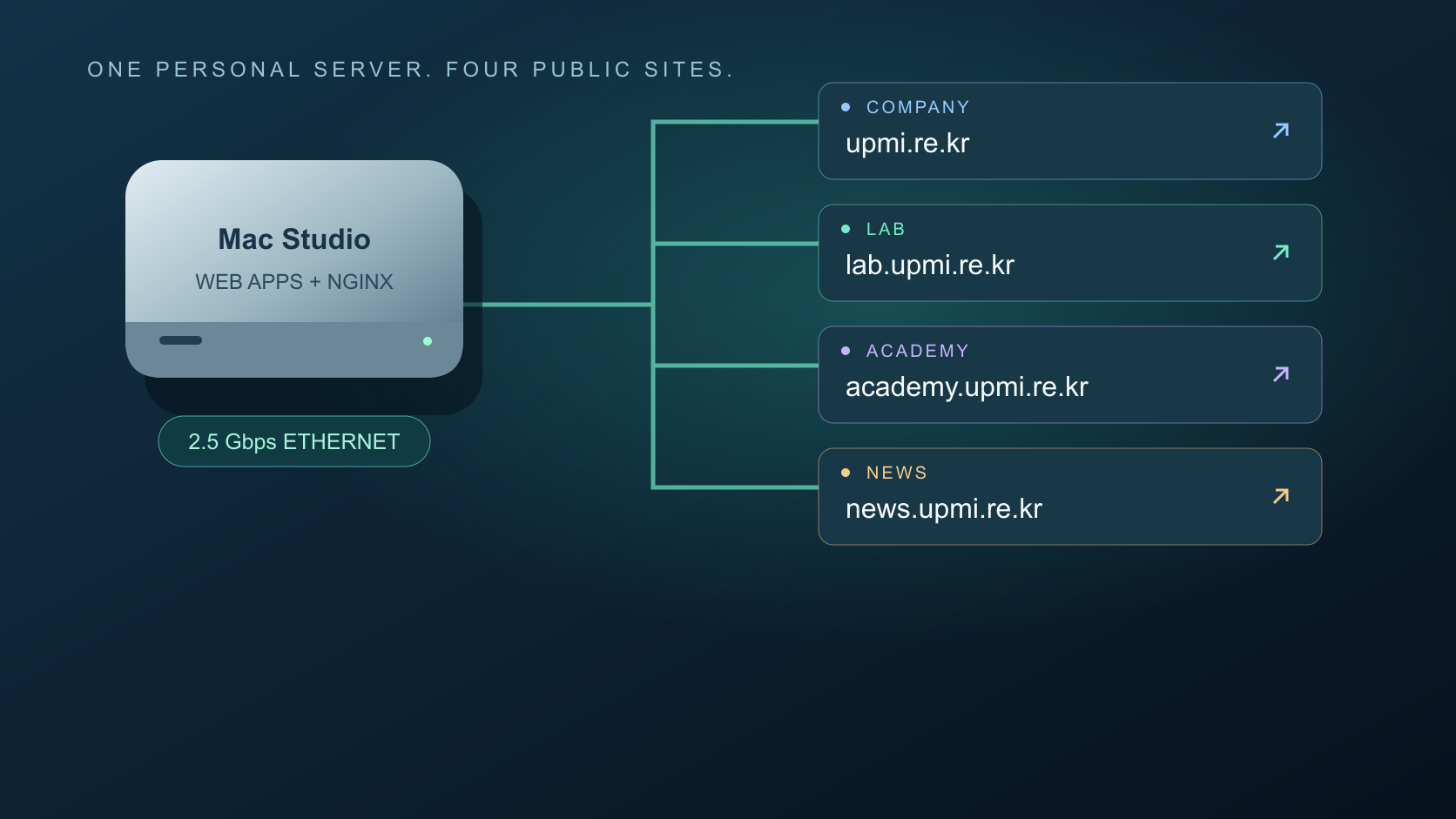
My company, projects, classes and news need different spaces. I run them on hardware I own and route each domain to its application.
DNS and HTTPS responses were checked for all four sites. The 2.5Gbps link is internal; delivery to outside visitors depends on Internet upload capacity.
REQUEST → PUBLISH → OPERATE
From “publish this” to a working public address.
Audience, content and scope
I provide sources and the intended result, then review what will be public.
Create, revise, publish
The agent updates text, assets and code, builds the site, checks links, deploys and verifies HTTPS.
Services and certificates
The process manager keeps applications running, while scheduled jobs renew certificates and reload the web server.
Diagnose, verify, recover
The agent inspects evidence and fixes issues. The deployment procedure preserves the previous release path for rollback if verification fails.
This connects repetitive work from creation through operation under my direction. It does not mean every failure or domain-renewal payment is handled without me.
CAPACITY / ASSUMPTIONS YOU CAN CHANGE
How many people can open a page together?
The tested maximum concurrent audience is not established. This scenario uses a measured upload rate and the current connection configuration.
Bandwidth bound 108 · Connection budget 119
Not a measured or guaranteed audience limit.Bandwidth: 795.6Mbps × 70% × seconds ÷ (8 × MB per visitor)
For 3.2MB transferred in five seconds, bandwidth allows approximately 108 simultaneous page opens. Assuming three to six active connections per visitor gives 59–108 in this model, suggesting 60–100 as a first load-test target, not a validated operating limit.
See measurement scope and model limits
Upload was measured on the wired server on October 1, 2026 with a 15-second maximum, upload-only networkQuality run. Three existing pages referenced approximately 1.22–3.13MB of initial first-party data and 1.33–9.57MB in total. Browser cache, lazy loading and third-party advertising change actual transfers.
The current Nginx setup has one worker and 1,024 connection slots. This model budgets 70% of them and two slots per active proxied request: client and upstream. Other sites, idle sockets and real-time sessions share these resources. CPU, TLS, disk and sustained load have not been validated by this model.
A short local HTML-only diagnostic succeeded for all 30 requests at concurrency five. It is not an external user load test. Video, live classroom sessions and AI inference need separate tests; the Lab chatbot currently generates one response at a time.
COULD THIS WORK FOR YOU?
Could this work in your setup?
How do I automate domains and publishing on my own server?
BUILD DETAILS
Build details & ideas to reuse
01Does every new website need another hosting plan?
I needed a company website for research and project results. Then I wanted a Lab for AI experiments and an Academy for classes. Choosing another hosting plan and learning another control panel for each site was cumbersome.
I used hardware I already owned. I describe the space I need, and an agent connects development, domain routing, publication and revisions. The company, Lab, Academy and news site now have separate public addresses.
02A NAS for networking, a Mac Studio for web applications
Incoming requests pass through a 1Gbps SK Broadband connection, the NAS running OpenWrt and the wired LAN to a Mac Studio M4 Max with 64GB of memory. Its Ethernet link currently negotiates at 2.5Gbps.
Nginx routes each requested hostname to the corresponding application. The company site, Lab and Academy run as separate services on the same machine. The NAS handles networking rather than directly serving every web application.
The 2.5Gbps LAN does not provide 2.5Gbps to Internet visitors. External delivery is constrained first by the Internet upload link.
03A new subdomain opens a new service
The base domain is upmi.re.kr. The lab, academy and news hostnames use CNAME records, and the web server routes each hostname separately. Adding one did not require another paid hosting account or another registered domain.
The work connects DNS configuration, application startup, Nginx routing and HTTPS certificates. It ends with checks at the public address.
Domain registration and renewal payments are separate from HTTPS certificate management. Scheduled jobs renew and apply certificates; that does not mean domain billing is fully automated.
04Content and code updates share a publishing workflow
I describe an outcome: add this project, replace a photo, shorten an explanation or create a teaching space. The agent reads the existing material and updates text, assets and page code together. I review the content and scope of publication.
Content and link checks precede a production build. A separate preview is checked before switching the live service. The procedure preserves the previous release and settings so a failed verification can trigger rollback.
This article follows the same workflow, connecting a main-page card, bilingual article, capacity calculator and searchable case data.
05Agent-driven changes and routine automation
Creation, revisions and new releases run in response to my requests. Predictable recurring work is handled by the process manager and scheduled jobs. Services are kept running, and certificate renewal is checked twice daily.
For a problem, the agent inspects state and logs, applies a fix and checks the public service. This reduces manual administration but does not automatically repair hardware or Internet outages.
The operating model connects a request, change, verification, deployment and recovery rather than stopping at installation.
06Concurrent capacity depends on what visitors do
A short upload measurement from the current server returned approximately 795.6Mbps. Three existing pages referenced 1.22–3.13MB of initial first-party assets. The model assumes 3.2MB per visitor, a five-second transfer budget and a 30% reserve.
795.6Mbps × 70% × 5 seconds ÷ (8 × 3.2MB) gives approximately 108 simultaneous page opens. Visitors who have finished loading and are reading the page represent a different metric.
The current Nginx configuration has 1,024 connection slots, including upstream connections, so that is not a 1,024-user limit. Assuming three to six active request connections per visitor gives approximately 59–108 with the same reserve.
I suggest 60–100 as an initial load-test target, not a verified maximum audience. Large downloads, video, classroom real-time sessions and AI inference require separate tests. The Lab chatbot currently generates one response at a time.
07The larger change is how quickly ideas become services
I now run four public destinations on hardware I own, without a separate hosting-server rental. When I need a feature, I can describe and implement it instead of searching a fixed control panel for an available option.
WordPress itself is free open-source software. This case describes custom applications without WordPress or a separate hosting product. Domain, Internet, electricity, hardware and AI costs remain.
I set the direction and content; the agent connects development, routing, deployment and verification. One website grew into an operating foundation for work, teaching and new services.
Scope and things to consider
Based on current service, DNS, HTTPS, Ethernet and upload checks. Audience figures are scenarios based on payload, transfer time and connection assumptions, not a measured external-load maximum.